

WooCommerce ERP Integration: Benefits, Best Methods & Top Tools for Growing Stores

WooCommerce ERP integration connects your store to a back-office ERP system so orders, stock levels, and customer data sync automatically. It replaces manual data entry with real-time updates through the WooCommerce REST API, prebuilt connectors, or middleware, cutting errors and speeding up fulfillment for growing stores.
Your WooCommerce store gets an order. Someone logs into the ERP and keys in the customer, the SKUs, the shipping address, and the payment status by hand. Multiply that by 200 orders a day and you have a full-time job that exists only because two systems refuse to talk to each other.
WooCommerce ERP integration fixes that. It links your store to your ERP so orders, inventory, and customer records move on their own, no copy-paste, no weekend spreadsheet reconciliation. This guide covers what WooCommerce ERP integration does, the methods available, the problems that trip up most setups, and the platforms worth considering for a growing store or distribution business.
What Is WooCommerce ERP Integration?
WooCommerce ERP integration is the process of connecting your WooCommerce store to an Enterprise Resource Planning (ERP) system so data flows between the two automatically. Orders placed on your site show up in the ERP within seconds. Stock changes in the warehouse update your product pages just as fast.
Before integration, most of this work happens by hand. A staff member exports orders, imports them into the ERP, and checks inventory counts against a spreadsheet, hoping nothing was missed. After WooCommerce ERP integration, that information moves through an API connection or a middleware tool instead.
For a small store selling a handful of products, this might not matter yet. For distributors and B2B sellers managing thousands of SKUs across multiple warehouses, WooCommerce ERP integration is the difference between knowing your real stock position and guessing at it.
Why Growing WooCommerce Stores Need ERP Integration
WooCommerce runs roughly a third of the world’s online stores, several million sites in total. That scale brings competition, and stores still running inventory and orders through spreadsheets fall behind once order volume climbs, which is exactly why WooCommerce ERP integration matters so much for growing sellers.
Here’s what WooCommerce ERP integration changes:
- Fewer stockouts and oversells. Inventory updates the moment a sale happens, across every warehouse and channel.
- Faster order processing. Orders route straight into the ERP’s fulfillment workflow instead of waiting on manual entry.
- Cleaner financial data. For stores that want cleaner financial data plus dashboard-level visibility, WooCommerce to Power BI integration is a natural next step.
- Better customer service. Support teams see real order and stock status instead of asking the warehouse to check.
- Room to grow. Adding a warehouse, supplier, or sales channel doesn’t mean rebuilding the workflow from scratch.
One industry analysis of ecommerce-ERP integrations found that connected systems process orders roughly three times faster than manual workflows and cut data-entry errors by more than 70% . At 200-plus orders a day, that’s the difference between hiring another clerk and not.
How Does WooCommerce ERP Integration Work?
A few standard routes handle WooCommerce ERP integration, and which one fits depends on your budget, order volume, and how many systems you’re juggling.
WooCommerce REST API
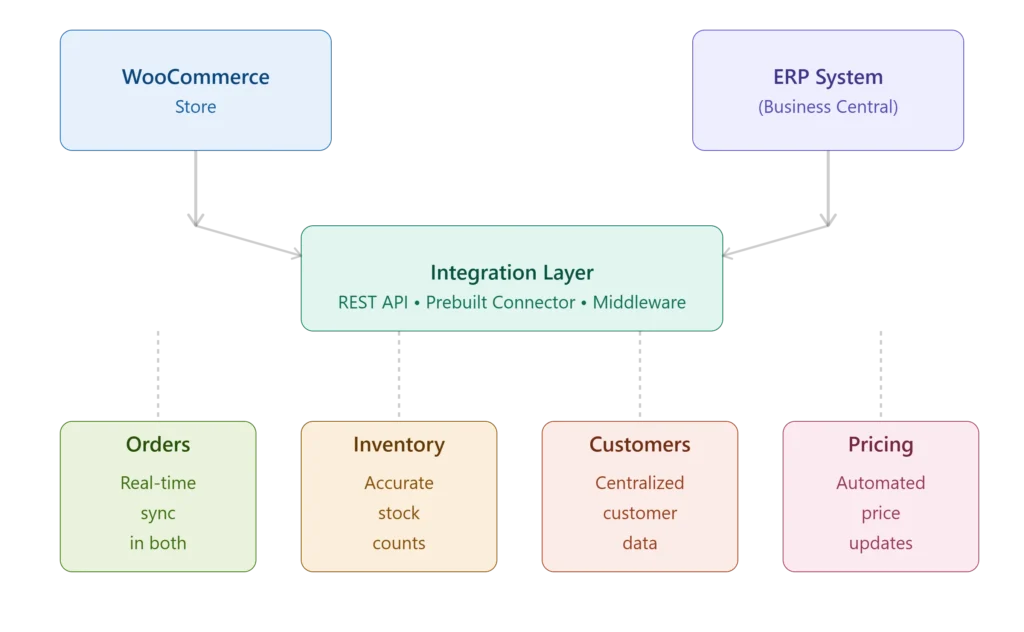
customers, and pricing in real-time.
WooCommerce ships with a REST API that exposes orders, products, customers, and inventory in JSON format. Enable it under WooCommerce > Settings > Advanced > REST API, generate a consumer key and secret, and any system that makes HTTP requests can read or write store data. This API is the foundation most integration methods build on.
Prebuilt Connectors and Plugins
Most major ERPs, including NetSuite, SAP Business One, Odoo, ERPNext, and Microsoft Dynamics 365 Business Central, have a ready-made WooCommerce connector. These map fields automatically and sync on a schedule or in real time, with far less setup than building from scratch.
Middleware and iPaaS Platforms
Integration platforms sit between WooCommerce and the ERP, handling field mapping, retries, and error logs without custom code on either side. This suits stores with more than one sales channel, since the middleware becomes a single hub instead of a separate connection for every system.
In-House vs. Managed Integration
Building it yourself gives full control, but your team owns authentication, error handling, and every future update. Handing it to a managed provider costs more upfront but removes the ongoing maintenance load, which matters most for stores without a dedicated engineering team.
Common Challenges in WooCommerce ERP Integration
Most WooCommerce ERP integration problems trace back to a handful of repeat offenders:
Inconsistent product data. Mismatched SKUs or unstandardized attributes cause the ERP to reject records or file them under the wrong product.
- Variant handling. WooCommerce nests variations under a parent product, while many ERPs treat each variant as its own item, and skipping this mapping breaks stock counts.
- Plugin conflicts. Checkout or subscription plugins can quietly change data formats and break a sync with no visible error.
- Sync delays. Without real-time updates or a queue, high-volume stores see orders pile up faster than the ERP can process them, leading to overselling.
- Silent failures. Orders with missing fields can fail to sync, and without alerts, nobody notices until a customer complains.
- Tax and currency mismatches. If WooCommerce’s tax setup doesn’t match the ERP’s tax codes, accounting has to reconcile the gap by hand.
Best Practices for a Smooth WooCommerce ERP Integration
- Clean up product data first. Standardize SKUs, names, and categories before connecting anything.
- Pick a connector built for WooCommerce, not a generic tool retrofitted to fit. Purpose-built connectors already handle variants, taxes, and custom fields.
- Audit your plugins. Know which ones touch order or product data, and test them before going live.
- Map variants explicitly, confirming how parent-child products translate into ERP-side SKUs.
- Use real-time sync with a queue, so traffic spikes don’t overwhelm either system.
- Set up error alerts. A sync that fails silently costs more than one that fails loudly.
- Test with real order scenarios, including discounts, partial refunds, and out-of-stock items.
- Review performance regularly, especially after a WooCommerce core update or plugin install.
Top ERP Tools for WooCommerce Stores
The right ERP for WooCommerce ERP integration depends on order volume, warehouse count, and how much you already spend on tooling. Here’s how the platforms most commonly paired with WooCommerce compare:
| ERP Platform | Best For | Key Strength | Typical Integration Method |
| NetSuite | Mid-size to enterprise, multi-entity businesses | Deep financials and multi-warehouse control | Native connector or iPaaS |
| SAP Business One | Manufacturers and distributors | Strong supply chain and production tools | Certified connectors |
| Odoo | Small businesses to enterprises with modular needs | Inventory, CRM, and accounting in one system | Official WooCommerce connector |
| Microsoft Dynamics 365 Business Central | Businesses already on the Microsoft stack | Tight Office and Power Platform integration | Prebuilt connectors |
| ERPNext | Budget-conscious small and mid-size businesses | Open-source, low licensing cost | REST API or community connector |
| WP ERP | Very small WooCommerce stores | Runs inside WordPress, low complexity | Native WordPress plugin |
If you run a single warehouse and a lean catalog, WP ERP or ERPNext keeps costs down. If you’re managing multiple warehouses, wholesale pricing tiers, or manufacturing, NetSuite, SAP Business One, or Odoo carry the operational weight a spreadsheet can’t.
How Much Does WooCommerce ERP Integration Cost?
WooCommerce ERP integration cost depends heavily on the method. A prebuilt connector for a mainstream ERP can run a few hundred to a couple thousand dollars a year in licensing, plus setup. A custom build typically starts around $2,000 to $5,000 for a basic one-way sync, climbing from there for real-time, two-way integration across multiple warehouses. Managed platforms usually charge a monthly fee based on transaction volume, so cost scales with your store instead of demanding a large upfront spend.
Weigh that number against what manual entry already costs in labor hours, mistakes, and delayed orders. For most stores doing meaningful volume, integration pays for itself within a year.
Key Takeaways
- WooCommerce ERP integration connects your store to your back-office system so orders, inventory, and customer data sync without manual entry.
- REST APIs, prebuilt connectors, and middleware are the three main integration routes.
- Clean product data and clear variant mapping prevent most sync problems.
- NetSuite, SAP Business One, Odoo, Dynamics 365 Business Central, and ERPNext each suit different store sizes and budgets.
- WooCommerce ERP integration typically pays for itself through fewer errors and faster order processing.
Conclusion
WooCommerce is a solid platform for selling, but it was never built to run your warehouse, your purchasing, or your books. That’s the ERP’s job. WooCommerce ERP integration puts both systems on the same page, so your team spends less time reconciling data and more time serving customers.
Start with a clean product data audit, then choose the WooCommerce ERP integration method that fits your order volume and technical resources. Whether that means a prebuilt connector or a managed integration partner, the goal stays the same: one accurate system, not two that argue with each other.
Ready to stop syncing orders by hand? Talk to BCWooCommerce integration team and get your store connected to the ERP it deserves.
Frequently Asked Questions
What is WooCommerce ERP integration?
WooCommerce ERP integration connects your store to an ERP system so orders, inventory, and customer data sync automatically. It removes manual data entry, keeps stock counts accurate across warehouses, and gives your team one reliable source of order and inventory information instead of two systems that slowly drift apart.
How do I connect WooCommerce to an ERP system?
Connect through WooCommerce’s built-in REST API, a prebuilt connector, or a middleware platform that handles field mapping and errors. Enable the API under WooCommerce Settings, generate access keys, then pick the method that matches your budget and warehouse count.
Which ERPs work best with WooCommerce?
NetSuite, SAP Business One, Odoo, Microsoft Dynamics 365 Business Central, and ERPNext all offer WooCommerce connectors. NetSuite and SAP Business One suit larger distributors, Odoo and ERPNext suit mid-size budgets, and WP ERP fits small stores that want ERP features without leaving WordPress.
Is WooCommerce ERP integration expensive?
Cost varies by method. A prebuilt connector can cost a few hundred dollars a year, custom development often starts around $2,000 to $5,000, and managed platforms usually charge monthly based on order volume. Most stores recover this cost within a year through fewer errors and less manual labor.
Can small WooCommerce stores benefit from ERP integration?
Yes. Even a single-warehouse store selling a few hundred SKUs benefits from automatic stock updates and order syncing, especially once volume grows past what one person can enter by hand. Lightweight options like WP ERP or ERPNext keep the cost low.
What data can be synced between WooCommerce and an ERP?
Most integrations sync orders, customers, products, SKUs, stock levels, pricing, tax details, and payment status. Advanced setups also sync purchase orders, backorders, multi-warehouse inventory, and returns.
How long does WooCommerce ERP integration take to set up?
A prebuilt connector for a standard catalog can go live in days to a couple of weeks. Custom or multi-warehouse integrations, especially with complex variant mapping or legacy ERP systems, typically take four to eight weeks from planning through testing.