

Managing Customer-Specific Catalogs in WooCommerce Using Business Central

If you are leading a B2B e-commerce strategy or managing a high-performing sales team, you already know the truth: B2B e-commerce is not simply B2C with larger shopping carts. It is an entirely different landscape.
When a B2C customer visits an online store, they see the same products and the same prices as everyone else. B2B transactions, however, run on relationships, negotiations, and specific contracts. Your best wholesale distributor does not pay the same price as a first-time corporate buyer. Furthermore, certain clients may have access to exclusive product lines or proprietary parts that your general audience should never even see.
If you try to force complex B2B relationships into a rigid, one-size-fits-all storefront, you end up frustrating your buyers, overwhelming your customer service team, and bottlenecking your sales managers. The solution lies in creating dynamic, customer-specific catalogs. For businesses running their operations on Microsoft Dynamics 365 Business Central and operating their storefronts on WooCommerce, integrating the two platforms is the key to unlocking a seamless, personalized B2B buying experience.
Here is a deep dive into how you can effectively manage customer-specific catalogs using Business Central and WooCommerce, and why this integration is a game-changer for your sales cycle.
The “One Size Fits Nobody” Problem
Before looking at the technical solution, it helps to understand the exact friction points your sales team and buyers face when dealing with a static catalog.
When a B2B buyer logs into a generic portal, several things go wrong:
- Pricing Confusion: They see the standard Retail/MSRP price and have to mentally calculate their negotiated discount, or worse, they email their sales rep to ask for a custom quote on items they already have a contract for.
- Irrelevant Product Clutter: A hospital buyer has to sift through industrial manufacturing equipment just to find the sterile supplies they need.
- Compliance Risks: Customers might accidentally order products that are not approved for their specific region or industry regulations.
- Manual Intervention: Your sales team spends hours manually reviewing web orders, adjusting pricing to match contract terms, and re-sending invoices.
This friction leads to abandoned carts, delayed orders, and a heavy administrative burden on your staff. B2B buyers today expect an “Amazon-like” digital experience: they want self-service, speed, and accuracy, but they still need it strictly tailored to their corporate terms.
The Architecture: Why Business Central and WooCommerce?
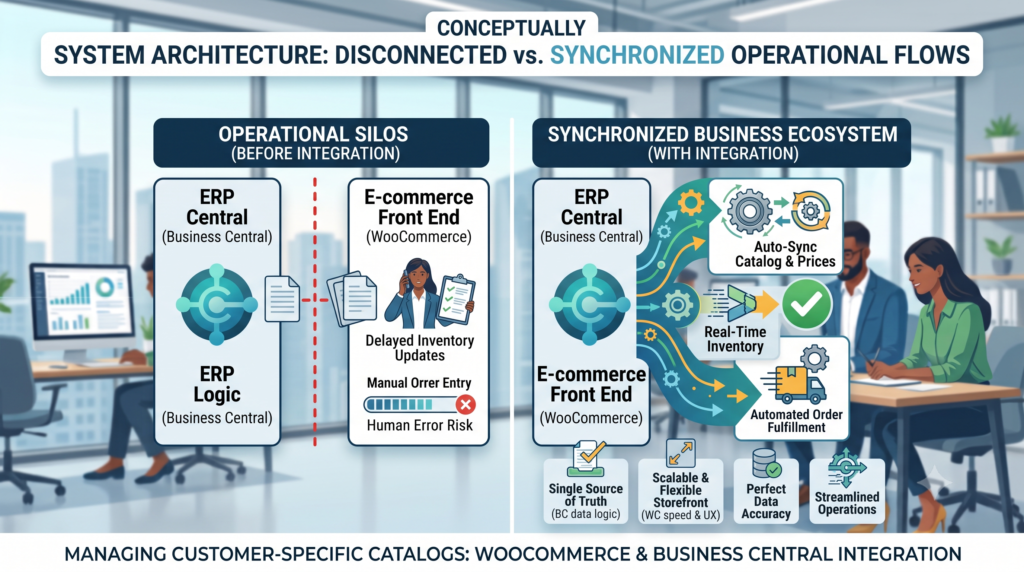
To solve this, you need two systems working in perfect harmony.
Microsoft Dynamics 365 Business Central acts as the brain. It is your single source of truth for all complex business logic. This is where your customer data, inventory levels, trade agreements, volume discounts, and pricing tiers natively live.
WooCommerce acts as the face. It provides the smooth, intuitive, user-friendly interface where your customers actually browse and buy.
When these two systems operate in silos, you are forced to duplicate data entry, leading to inevitable human error. When they are integrated, Business Central dictates the rules, and WooCommerce dynamically changes its appearance and pricing based on exactly who is logging in.
Strategies for Executing Customer-Specific Catalogs
Managing specialized catalogs requires more than just hiding a few web pages. It requires a synchronized data flow. Here is how you can practically manage this workflow.
1. Mapping Customer Profiles and Groups
The foundation of a personalized catalog is identifying the user. When a customer logs into WooCommerce, that user profile must be mapped to their specific Customer Card in Business Central.
Instead of managing thousands of individual user rules on your website, you can leverage Customer Price Groups or Customer Discount Groups within Business Central.
- Tier 1 Distributors might get a flat 30% off standard pricing.
- Regional Wholesalers might get 15% off, but only on specific categories.
- Enterprise Clients might have entirely custom, fixed-price contracts for specific SKUs.
By categorizing your clients in your ERP, the integration simply passes the user’s “Group Identity” to WooCommerce upon login, instantly re-calculating the entire store’s pricing to match their specific profile.
2. Implementing Trade Agreements
B2B pricing rarely relies on simple percentage discounts. It often involves complex trade agreements. For example, a customer might pay $10 per unit for the first 100 units, but $8 per unit if they buy 500 or more. Furthermore, these agreements often have start and end dates based on promotional periods or contract renewals.
Business Central handles complex Sales Prices and Sales Line Discounts effortlessly. A strong integration pushes these logic rules directly into WooCommerce. When a buyer adjusts the quantity in their cart, the WooCommerce interface should dynamically reflect the volume price breaks defined in Business Central. This eliminates the need for buyers to call a rep to confirm their bulk rate.
3. Dynamic Product Visibility
Pricing is only half the battle; the other half is visibility. A true customer-specific catalog dictates what a user is allowed to buy.
You can configure Business Central to flag certain Items or Item Categories as restricted or exclusive. When synced to WooCommerce, the website reads these flags and alters the storefront accordingly:
- Exclusive SKUs: A franchiser can log in and see custom-branded packaging materials that are entirely invisible to standard guest users or other clients.
- Restricted Catalogs: If a buyer does not have the necessary licensing or geographic clearance to purchase certain chemicals or heavy machinery, those product pages simply do not exist for them.
- Curated Portals: You can create an entirely streamlined experience where a returning buyer logs in and only sees a “Quick Order” catalog featuring their 50 most frequently purchased items, filtering out the thousands of other SKUs you sell.
4. Real-Time Inventory and Allocation
Nothing damages a B2B relationship faster than accepting an order for crucial supplies, only to call the client the next day to say the item is backordered.
Because customer-specific catalogs often deal with highly specialized items, inventory accuracy is vital. Business Central manages your warehouse logistics. Your integration must ensure that inventory levels are pushed to WooCommerce in near real-time. If a specific customer is viewing their custom catalog, they need to see exactly how much of their contracted inventory is currently available to ship.
The Strategic ROI for Sales Managers and Directors
Implementing this technology is not just an IT upgrade; it is a fundamental shift in how your sales team operates.
Eliminating Order Entry Overhead
Sales reps are highly compensated to build relationships, negotiate complex deals, and close new accounts. They should not be acting as glorified data-entry clerks. When customers have access to an accurate, personalized digital catalog, they can place their own reorders seamlessly. The order flows directly from WooCommerce into Business Central without a human touching it, automatically applying the correct discounts and terms.
Accelerating the Sales Cycle
Waiting on quotes kills momentum. If a buyer realizes at 9:00 PM on a Tuesday that they need to restock a key component, they shouldn’t have to wait until Wednesday morning to email a rep, wait for a quote, and sign a purchase order. With a custom catalog, the pricing is already approved. They log in, add to cart, and check out.
Reducing Costly Errors
Manual order entry is prone to mistakes. A rep might accidentally quote last year’s pricing, or type in the wrong SKU. These errors result in messy credit memos, return shipping costs, and frustrated buyers. By letting Business Central’s established logic drive the WooCommerce frontend, you ensure 100% accuracy on every single digital order.
Deeper Customer Insights
When buyers use a self-service portal, you gather data. Sales managers can look at WooCommerce analytics and Business Central order histories to identify trends. If a client frequently logs into their specific catalog, browses a new product category, but abandons the cart, your sales team now has a warm lead. They can proactively reach out to discuss that specific product line and offer a tailored incentive.
Conclusion
Transitioning your B2B sales operation from manual processes and generic storefronts into a dynamic, personalized digital experience is a major competitive advantage. B2B buyers increasingly prefer digital self-service, provided that the system actually understands their unique corporate needs.
By using ERP capabilities of Microsoft Dynamics 365 Business Central and pairing it with the flexibility of WooCommerce, you create a powerful sales ecosystem. You can deliver customized pricing, exclusive product visibility, and a frictionless purchasing experience that respects the complexities of B2B contracts.
This approach frees your sales team from administrative drudgery, allowing them to focus on acquiring new accounts and nurturing key relationships. If you are looking to streamline this exact setup and integrate your ERP with your digital storefront seamlessly, exploring specialized integration solutions like BC wooCommerce is an excellent next step toward future-proofing your e-commerce strategy. Empower your buyers, automate your rules, and watch your B2B sales grow.